When we first wrote about ADA-compliant websites in 2021, digital accessibility was mostly a matter of good practice and general legal risk. There was no federal regulation spelling out what an accessible website had to look like, and most business owners treated it as a nice-to-have. That has changed. The legal landscape has shifted, the lawsuits have multiplied, and the standard your site gets measured against is now clearly defined. If you run a business website in 2026, here is what you actually need to know.
Quick Answer: What Is ADA Website Compliance in 2026?
ADA website compliance means building and maintaining a website that people with disabilities can use, in line with the Web Content Accessibility Guidelines (WCAG) 2.1 Level AA. In 2024 the Department of Justice adopted WCAG 2.1 Level AA as the official standard for government websites, and courts now treat that same standard as the benchmark for private businesses too. Automated overlay widgets do not make a site compliant, and web accessibility lawsuits hit record highs in 2025, with e-commerce sites as the primary target.
What Changed Since Our Last ADA Article
The biggest development is that the federal government finally defined a technical standard. On April 24, 2024, the DOJ issued a final rule under Title II of the ADA requiring state and local governments to make their websites and mobile apps conform to WCAG 2.1 Level AA. For the first time, regulators put a specific, measurable standard behind the phrase "accessible website."
Those deadlines were later adjusted. The original dates were April 24, 2026 for larger public entities and April 26, 2027 for smaller ones. In April 2026, just before the first deadline landed, the DOJ extended both by a year. Large public entities now have until April 26, 2027, and smaller entities and special districts until April 26, 2028. The extension only moved the dates. The WCAG 2.1 Level AA standard itself did not change.
Now, you might be reading this as the owner of a resort, a manufacturing company, a nonprofit, or a small business and thinking none of that applies to you. That is the part worth slowing down on.
Does This Apply to My Business?
The Title II rule directly covers governments, public universities, courts, libraries, and special districts. If you are not a public entity, that specific rule and its deadlines are not aimed at you.
But here is the catch. Private businesses fall under Title III of the ADA, and while there is still no federal regulation naming a specific technical standard for commercial websites, the absence of a named standard has never stopped the lawsuits. Courts hearing accessibility cases against private businesses increasingly point to WCAG 2.1 Level AA as the yardstick. In practice, the government rule has become the standard the entire web is measured against, yours included. So the honest answer is: the deadlines do not apply to you, but the standard effectively does.
The Numbers Every Business Owner Should See
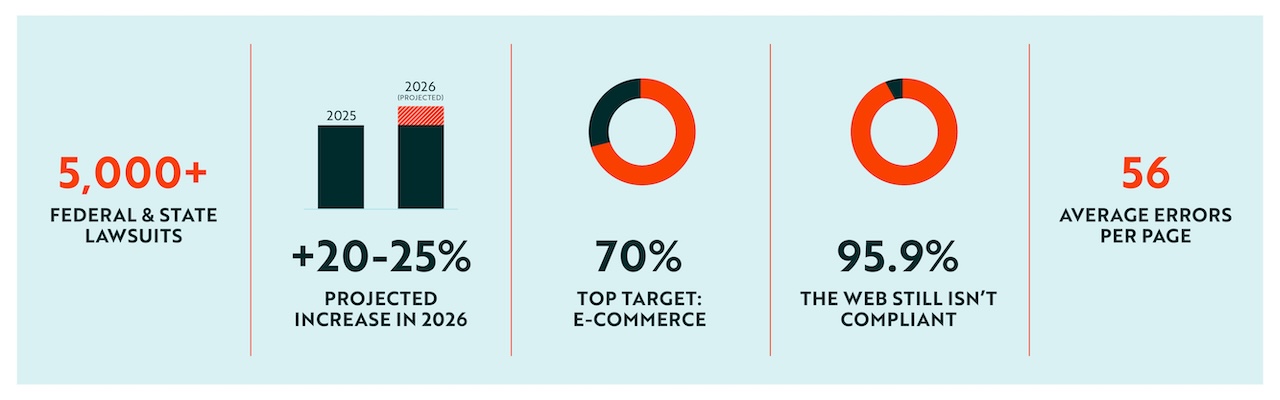
Web accessibility lawsuits are climbing, not slowing. More than 5,000 federal and state accessibility lawsuits were filed in the United States in 2025, and midyear 2026 data projects that figure rising another 20 to 25 percent. E-commerce sites are the leading target, making up roughly 70 percent of filings, and no industry has proven exempt.
This is not just a big-company problem. A large share of these suits target small and mid-sized businesses, often through demand letters that never become public. And the platform you built on does not shield you. Lawsuits in 2025 hit sites on WordPress, Shopify, Squarespace, and every other major platform.
Meanwhile, most of the web still is not compliant. The 2026 WebAIM Million report, an annual scan of the top one million homepages, found that 95.9 percent had at least one detectable WCAG failure, averaging about 56 errors per page. Non-compliance is the norm, which is precisely what makes it an easy target.
The Six Problems Behind Most Failures
The good news is that most accessibility failures come down to a short list of recurring issues, and they are the same categories we flagged back in 2021:
- Low-contrast text
- Missing image alt tex
- Missing form labels
- Empty links
- Empty buttons
- Missing document language.
These six account for the large majority of all WCAG failures, and they are also among the fastest and most affordable things to fix. If you do nothing else, starting here removes a meaningful chunk of your risk.
A Warning About Overlay Widgets
If there is one lesson from the past two years, it is that accessibility overlay widgets do not protect you. These are the plug-in scripts that promise to make any website instantly compliant by dropping in an accessibility button or letting users tweak display settings.
They do not work the way they are marketed. An overlay cannot rewrite broken code, fix a bad heading structure, or make a custom component work with a screen reader. Those problems require real code-level remediation. The data is blunt about it. A substantial portion of the businesses sued in 2025 already had an overlay installed at the time, and the Federal Trade Commission fined one leading overlay vendor $1 million for falsely claiming its tool could make any site compliant. Plaintiff firms have learned to treat the presence of a widget as a signal that the real site underneath is broken. Installing one and calling it done is one of the riskier moves a business can make right now.
What About WCAG 2.2?
WCAG 2.1 Level AA is the current benchmark, but the guidelines have advanced. WCAG 2.2 adds new criteria around mobile usability, cognitive accessibility, and authentication, and it is fully backward-compatible, meaning if you meet 2.2 you automatically meet 2.1. Building to 2.2 now is a smart way to future-proof rather than remediate twice. WCAG 3.0 is still an early working draft and is years away from mattering for compliance.
Why This Is Worth Doing Anyway
Legal risk is real, but it is not the only reason to build an accessible site. More than a billion people worldwide live with a disability, spanning visual, hearing, cognitive, and motor impairments. That is a large slice of your potential audience, and an accessible site simply serves them better.
Accessibility also overlaps with everything you already want from your website. Clean semantic code, descriptive alt text, logical structure, strong contrast, and clear labels all improve your search rankings, make your content easier for AI systems to read and cite, and create a better experience for every visitor. Good accessibility and good web design have become the same work.
Where to Start
You do not have to fix everything at once. Begin with the big, common failures, contrast, alt text, and form labels, since those are the cheapest wins and appear on nearly every non-compliant site. Run an automated scan for a baseline, but know its limits, since automated tools catch only about a third of real issues. Follow up with manual testing and human review using assistive technology to catch what scanners miss. Then build accessibility into your templates so new content stays compliant instead of drifting back out of line.
The goal is to make accessibility part of how your site operates, not something you scramble to retrofit after a demand letter shows up.
Need an Accessibility Audit?
The web has changed since 2021, and so has the standard your site is measured against. Our website audit identifies the accessibility issues that create real legal and usability risk, then backs it with a clear report and developer-led remediation rather than a widget that hides the problem.
If you are not sure where your site stands, that is exactly what an audit is for. Schedule your website audit today and we will help you get a real answer.
Frequently Asked Questions
Yes, in practice. Private businesses fall under Title III of the ADA. There is no federal regulation naming a specific technical standard for commercial websites, but courts hearing accessibility lawsuits increasingly hold private businesses to WCAG 2.1 Level AA, the same standard the government adopted for public entities in 2024. The deadlines set for government sites do not apply to you, but the standard effectively does.